Close More Fence Jobs with the Fence Visualizer
Show homeowners what their fence looks like before you build it — and close the job on the first visit. White-label it with your brand, embed it on your website, use it on-site.
DIY fence project?
One-time use from $4.99
No subscription needed · 5 or 10 visualizations · See your fence before you buy
Learn more →White-Label Embed
Your company name, your colors, your fence styles — customers see your brand, not ours
Custom Style Library
Choose the fence styles you actually sell — we integrate them into your visualizer
Real-Time Rendering
AI renders fences onto customer yard photos in seconds — on-site or online
CRM Integration
Every visualization generates a lead. Syncs to your CRM automatically
How It Works
Three steps to show customers their fence before you build it
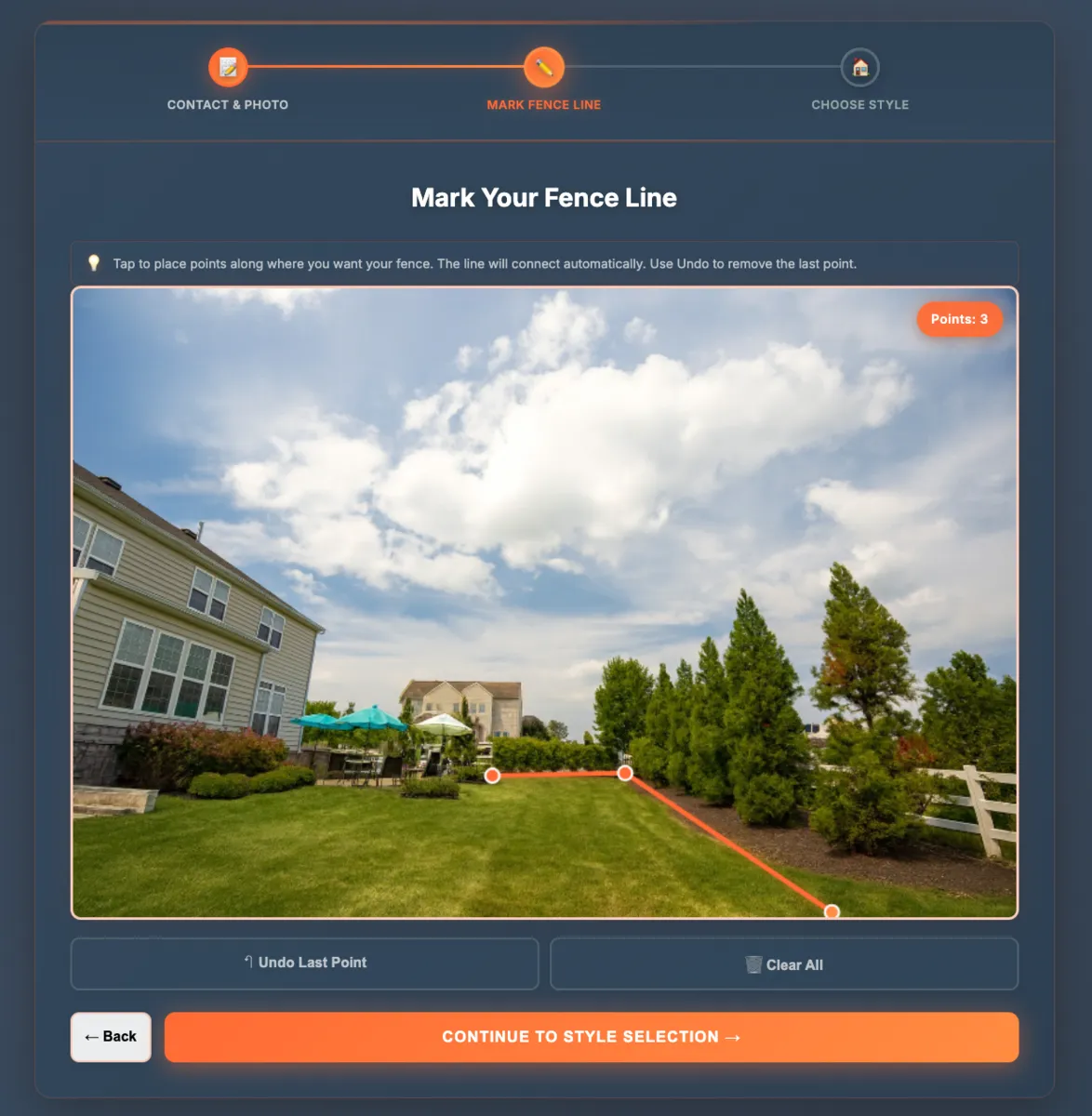
Snap the Yard Photo
On-site or from a customer-submitted photo — upload and mark the fence line
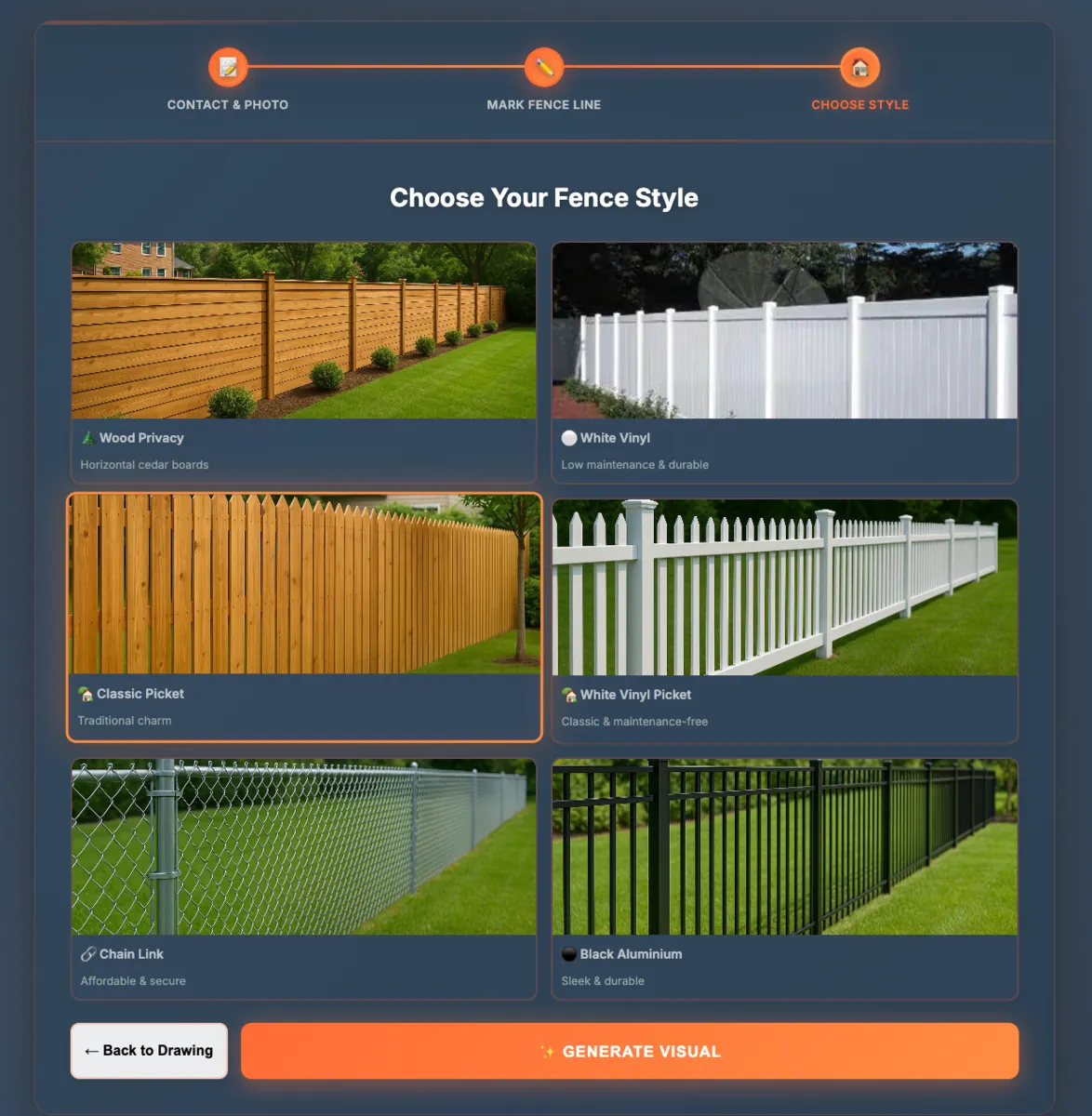
Select from Your Styles
Choose from the fence styles you actually sell — your custom inventory
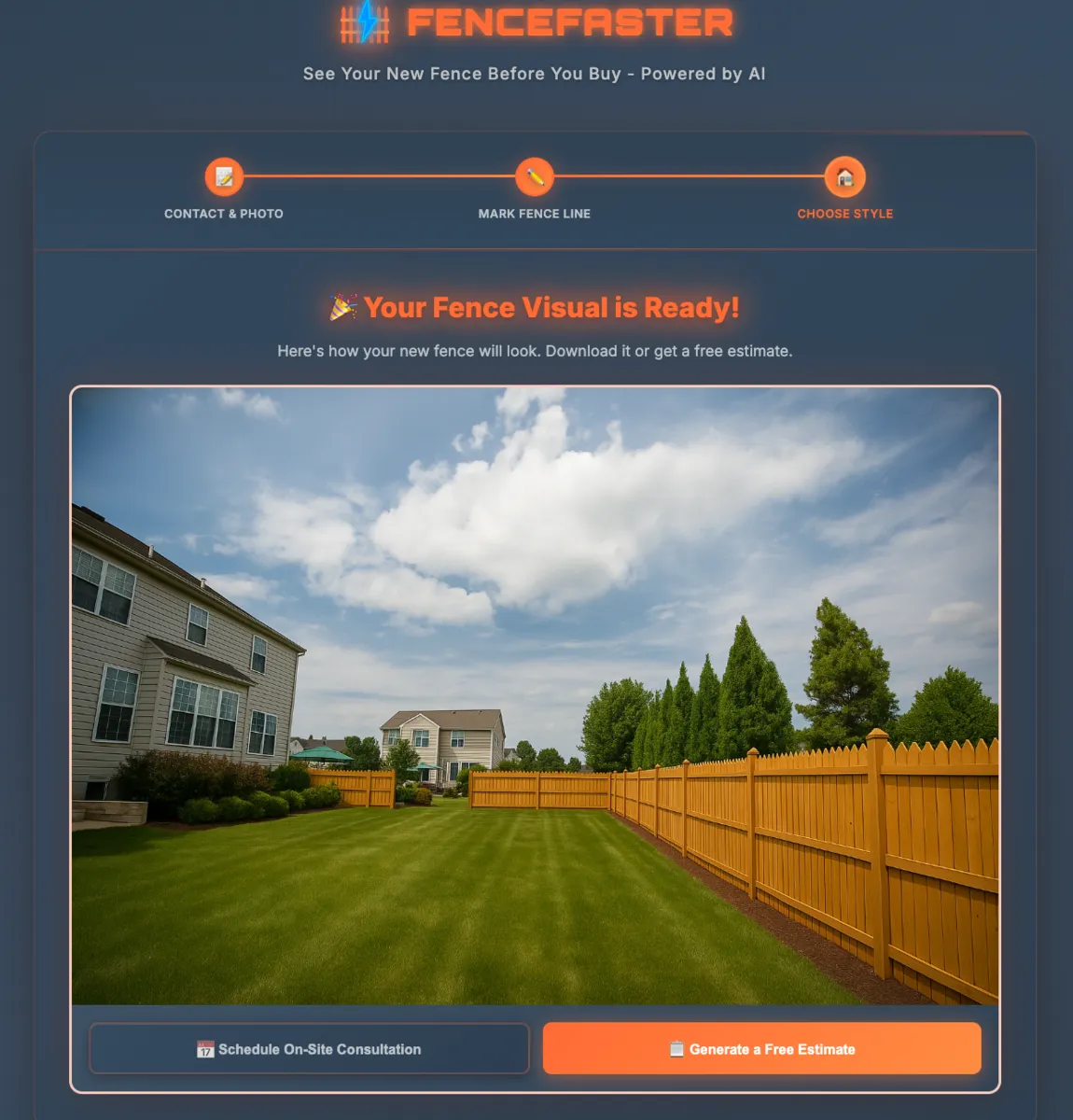
Show the Customer & Close
Turn your phone around and show them their fence — then close the job
Contractor Plans
Add the Fence Visualizer to your sales process. Show homeowners what their fence looks like before you build it — and close the job on the first visit.
Contractor Starter
$49/mo
100 visualizer runs/month
- 100 visualizer runs/month
- Pick 6 fence styles we integrate for you
- White-label embed — your brand and colors
- CRM integration
- Quote generator integration
- Mobile-friendly — works in the field
- No setup fee — cancel anytime
Pays for itself on the first extra close.
Contractor Pro
$99/mo
300 visualizer runs/month
- 300 visualizer runs/month
- Pick 12 fence styles we integrate for you
- Everything in Starter
- White-label embed — your brand and colors
- CRM + Quote Generator integration
- Mobile-friendly — works in the field
- No setup fee — cancel anytime
The sweet spot for growing fence companies.
Enterprise
$179/mo
500+ visualizer runs/month
- 500+ visualizer runs/month
- Pick 20+ fence styles we integrate for you
- Everything in Pro
- Custom iOS app — built for your company
- White-label embed — your brand and colors
- CRM + Quote Generator integration
- Priority support
Your own fence visualization app in the App Store.
How the Yard Visualizer Works
Four steps from photo to closed deal. Your customers see exactly what their fence will look like — on their actual property, not a stock photo.
Submit Info
Customer uploads a photo of their yard and enters basic contact info. Lead goes straight to your CRM.
Mark Fence Line
Customer draws a simple reference line showing where they want the fence. Takes 10 seconds.
Choose Style
Customer picks from your custom fence style library — the styles YOU sell, with YOUR brand on the page.
View Visual
AI renders the fence onto their actual yard photo in seconds. Customer sees exactly what they're buying.
Where to Use It
Facebook & Instagram Ads
Run ads that link directly to your branded visualizer. Lead submits photo → enters CRM → you follow up.
Door Hangers with QR Code
QR code on the hanger opens your visualizer. Homeowner scans, uploads, sees their fence. Lead captured automatically.
Flyers & Direct Mail
Include a QR code or short URL. Same flow — homeowner goes from print to photo upload to lead in your pipeline.
Website Embed
Embed the visualizer on your website. Visitors use it 24/7, generating leads while you sleep.
On-Site Estimates (iPad)
Pull it up on your tablet at the customer's kitchen table. Snap a photo, show 3 fence styles, close the job.
Follow-Up Campaigns
Send a visualization link in your follow-up emails. Keeps the customer engaged and moves them toward a decision.
Lead Capture → CRM Pipeline
Every visualization generates a lead. The customer's contact info, yard photo, chosen fence style, and rendering all flow directly into your CRM. No manual entry. Your sales team sees the lead with full context — what style they liked, what their yard looks like — and can follow up with a quote immediately.
How Fence Contractors Use the Visualizer to Close More Jobs
You're at a homeowner's kitchen table. Instead of describing what a cedar privacy fence looks like, you pull up FenceFaster on your tablet, upload the photo you just took of their yard, and show them 3 fence styles rendered on their actual property in under 2 minutes.
The homeowner picks their favorite. You generate a quote on the spot. You close the job that day — before the other two contractors they called even send their bids.
When a homeowner is choosing between 3 fence contractors, the one who shows them a visual rendering wins. It's not about lowest price — it's about giving the customer confidence.
ROI Math
Average fence job: $3,000–$5,000
Extra jobs closed per month with visualization: 2
Additional monthly revenue: $6,000–$10,000
The tool pays for itself on the first extra close.
Best Fence Visualizer: How FenceFaster Compares
The only fence visualizer with built-in quoting and CRM. Here's how we stack up against every competitor.
| Feature | FenceFaster | FenceVisualizer.com | RealityFence | FencePlanner |
|---|---|---|---|---|
| See It On Your Yard | ||||
| Photo Upload | ||||
| AI Rendering | AR only | |||
| Quote Integration | ||||
| CRM Integration | ||||
| White-Label Embed | ||||
| Mobile-Friendly | Unknown | iOS only |
Add a Fence Visualizer to Your Website
The visualizer on your website looks like YOUR tool — your brand name, your colors, your fence style library. Homeowners think they're using your company's proprietary technology. FenceFaster powers it behind the scenes.
24/7 Lead Generation
Homeowners visit your site, use the visualizer, fall in love with a style, and request a quote — all while you sleep.
Your Brand, Our Technology
White-label embed built to your brand name and colors. Your customers see your company, not FenceFaster.
Visualizer → Quote → CRM
One integration, three functions. Lead enters your CRM automatically with a quote estimate attached.
Lead generation flow diagram: Homeowner visits site → uses visualizer → requests quote → lead enters CRM → you follow up
AR vs. AI Visualization: Which Is Better for Sales?
AR fence apps let you point your phone camera at a yard and see a fence overlaid in real time. Cool tech. But the reality: it requires being on-site, depends on lighting, styles are limited, and it only works on AR-capable smartphones. It's a demo, not a decision-making tool.
AR Approach (RealityFence)
- Requires being on-site with the customer
- Depends on lighting and camera quality
- Limited style library
- iOS-only app download required
- Results are ephemeral — can't save easily
AI Photo Rendering (FenceFaster)
- Works from the office — no site visit needed for initial visualization
- Consistent quality regardless of lighting
- Full style library — every material and color
- Any device, any browser, no download
- Save, share, and use for follow-up presentations
Practical AI beats flashy AR. For a contractor doing 5-10 estimates per week, the photo approach saves hours.
Mobile Field Tool: Phone in Hand, Job in Pocket
FenceFaster works in your mobile browser — no app store download. Open fencefaster.io on your phone, upload a photo you just took, and show the homeowner what their fence looks like while you're standing in their yard.
The On-Site Workflow
Arrive at the customer's property
Snap a photo of the yard
Open FenceFaster on your phone
Upload and select a fence style
Turn your phone around and show the homeowner
They pick a style — generate a quote on the spot
Close the job. One visit.
Phone vs. Tablet
Phone: Faster for on-site snap-and-show demos. Always in your pocket.
Tablet (iPad): Bigger screen for sit-down sales presentations. Better for showing side-by-side comparisons.
Both work with FenceFaster. Use your phone on-site, tablet for kitchen-table presentations.
Same-day quote → closed job. The contractor who sends a quote same-day closes more often than the one who sends it 3 days later. Mobile visualization makes same-day quoting possible — everything happens on your phone at the customer's property.
Frequently Asked Questions
How much does FenceFaster cost for contractors?
FenceFaster offers three contractor plans: Starter at $49/month (100 runs, 6 fence styles, white-label embed, CRM integration), Pro at $99/month (300 runs, 12 styles, everything in Starter), and Enterprise at $179/month (500+ runs, 20+ styles, custom iOS app, priority support). No setup fee, cancel anytime.
What is the ROI of a fence visualization tool?
Average fence job is $3,000–$5,000. Contractors using visualization close an estimated 2 extra jobs per month, generating $6,000–$10,000 in additional monthly revenue. The Starter plan costs $49/month — the tool pays for itself on the first extra close.
Can I add a fence visualizer to my website?
Yes. FenceFaster provides a white-label embed that looks like your own tool — your brand name, your colors, your fence style library. Homeowners think they're using your company's proprietary technology. They use the visualizer, fall in love with a style, and request a quote — all while generating leads for your CRM automatically.
Does FenceFaster work on mobile in the field?
Yes. FenceFaster works in any mobile browser — no app download needed. The on-site workflow: arrive at the property, snap a yard photo, open FenceFaster on your phone, upload and select a fence style, turn your phone around and show the homeowner. Use your phone for quick on-site demos, tablet for sit-down kitchen-table presentations.
How does the white-label branding work?
When you sign up, we set up your visualizer with your company name, logo, colors, and the specific fence styles you sell. Your customers never see FenceFaster branding. The embed goes on your website and generates leads directly into your pipeline.
Is AR or AI visualization better for fence sales?
AI photo rendering (FenceFaster) is more practical for sales than AR. AR requires being on-site, depends on lighting, has limited styles, and only works on iOS. FenceFaster works from the office or on-site, produces consistent quality, offers a full style library, and runs on any device.
Can I choose which fence styles appear in my visualizer?
Yes. You select the fence styles you actually install — we build them into your custom style library. Starter includes 6 styles, Pro includes 12, and Enterprise includes 20+. Only show customers what you can actually build.